How I Finally Built My Own Static Blog with Codex and Cloudflare Pages

For years, I have had a personal website in one form or another.
What I did not really have was a blogging setup I actually wanted to use.
I had written plenty of longer-form content already, including 17 articles on LinkedIn, but those articles effectively lived inside somebody else’s platform. I wanted them on my own site, under my own domain, in a format I could keep, edit and deploy without maintaining another WordPress installation or running a server just for a blog.
After several iterations, a migration from Google Cloud Storage, a short and slightly broken stay on Netlify, and a surprisingly effective session with OpenAI Codex, I finally have it.
A static blog, hosted on Cloudflare Pages, deployed from my own code and containing all 17 of my existing LinkedIn articles.
And the hosting bill for the blog itself is effectively $0.
Where I started: a static site on Google Cloud Storage
My personal site was already fairly lightweight.
Rather than running a traditional web server, part of its history involved hosting the static site through a Google Cloud Storage bucket.
There is something I still like about this model.
You upload HTML, CSS, JavaScript and assets. There is no PHP runtime, no database and no operating system sitting there waiting to be patched. A static website is just files.
For someone with a cloud infrastructure background, hosting a site from a storage bucket also has an appealing simplicity to it.
But there are rough edges.
Static bucket website hosting can involve its own collection of configuration details around index.html, 404.html, object permissions, DNS and URL handling. When something is wrong, you can end up looking at a Google Cloud XML storage response rather than the webpage you expected.
It worked, but over time I wanted something closer to a modern Git-based deployment workflow.
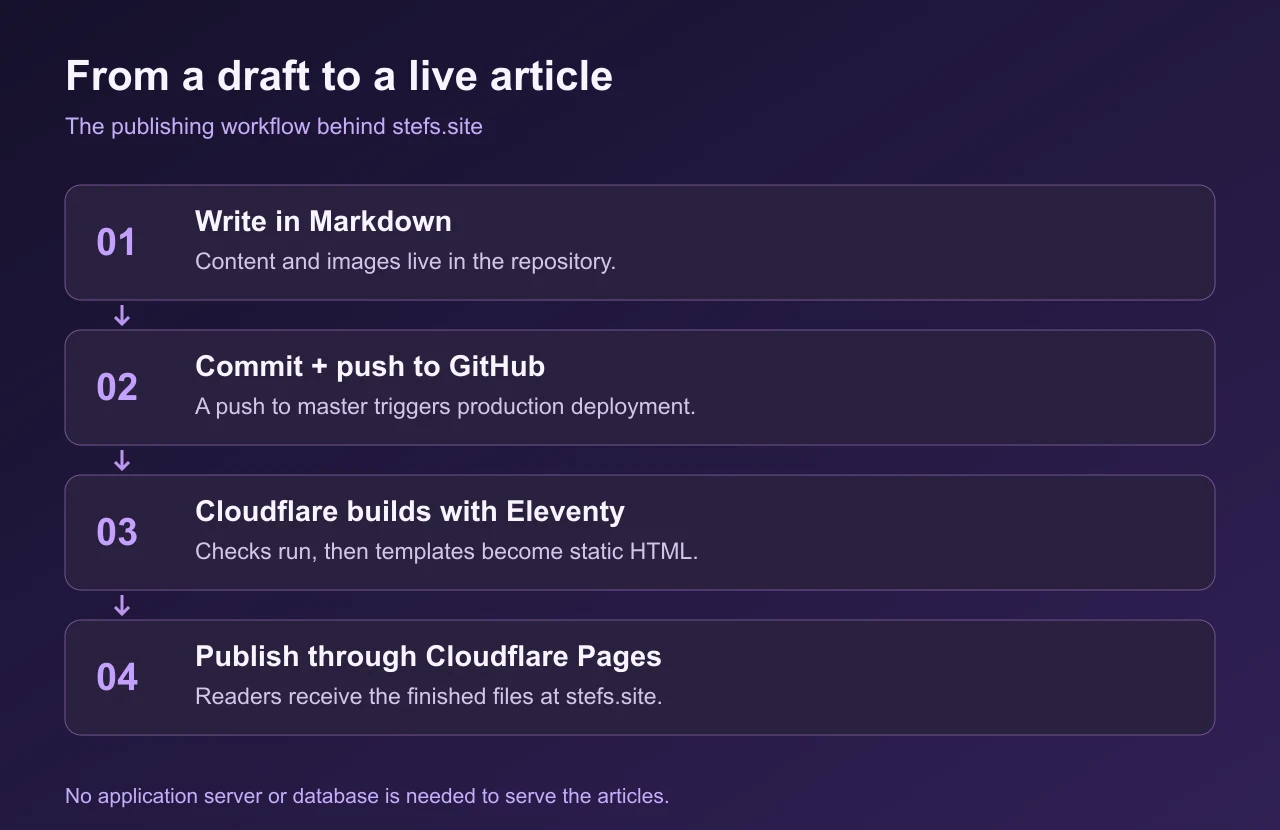
I wanted this:
Edit → commit → push → deployed.
And I wanted adding a blog to the site to remain completely static.
- No application server.
- No database.
- No WordPress installation.
- No server maintenance.
The Netlify detour
Netlify was one of the obvious places to try next.
For static websites it has an extremely low barrier to entry, and moving the site there initially seemed straightforward.
Then parts of my existing site started breaking.
One of the most obvious casualties was the mobile hamburger menu.
The HTML and CSS were there, but some of the JavaScript the existing site expected was not loading correctly. I was seeing missing assets and 404 responses, including problems involving files such as:
custom-scripts.js
There were also some artefacts left over from previously saved/exported pages.
This was a useful reminder of something that is easy to forget when moving an old static site between hosting platforms:
Static does not automatically mean portable.
- Paths matter.
- Filename case matters.
- The location of your JavaScript matters.
And if an older frontend relies on something like Bootstrap, its JavaScript dependencies matter too.
A site can look perfectly fine on the desktop while one missing JavaScript file quietly destroys the mobile navigation.
The Netlify deployment therefore turned into a debugging exercise: checking relative paths, locating scripts, removing saved-page cruft and verifying which JavaScript dependencies the original site actually expected.
Netlify itself was not really the problem. It exposed assumptions in the site that the previous hosting arrangement had allowed me to ignore.
But by this point, I was already using Cloudflare heavily around my domains and infrastructure.
So I started thinking: why add another platform?
Moving the site to Cloudflare Pages
The final destination became Cloudflare Pages.
This made much more sense for my setup.
My domains and DNS already fit naturally into the Cloudflare ecosystem, while Pages gives me the deployment model I actually wanted for a static site.
The repository becomes the source of truth.
Push a change to Git.
Cloudflare builds or publishes the site.
The new version goes live.
There is no server for me to manage.
There is no VM sitting around doing almost nothing.
There is no Kubernetes cluster comically overqualified for serving a personal blog.
And for what I am doing, the free tier is more than enough.
It also gets me away from the older workflow of treating a cloud storage bucket as if it were a web hosting platform.
The difference is subtle but important.
With the bucket, I was essentially hosting some files.
With Pages and Git, I have a deployment workflow.
That distinction made the blog project much more appealing.
The bigger problem: I already had 17 articles
Building the blog layout was only half the job.
The other problem was content.
My LinkedIn profile already contained a catalogue of 17 LinkedIn Articles.
Manually migrating them would have been tedious.
For every article I would need to bring across the content, clean up formatting, create the local post, make sure headings and links survived, add the appropriate metadata and then verify that it rendered correctly inside the new site.
Multiply that by 17 and suddenly my small static-blog project becomes a data migration.
This turned out to be the part where Codex was genuinely useful.
Giving Codex the job
Instead of asking an AI to simply "make me a blog", I gave Codex context about the project and the existing site.
The new blog needed to feel like part of stefs.site, rather than a completely unrelated template.
There were a few important requirements:
- retain the existing purple visual identity;
- support dark mode;
- remain a static site;
- integrate naturally with the existing personal site;
- keep the implementation maintainable;
- treat my LinkedIn Articles catalogue as the source material;
- make future articles easy to add;
- pay attention to SEO, accessibility and performance.
Importantly, I also wanted design decisions considered before Codex went too far into implementation.
That changed the experience considerably.
Instead of generating one enormous block of disposable website code, Codex could work against the actual project structure and progressively modify the repository.
And then came the part I really did not want to do manually:
the LinkedIn migration.
Codex imported all 17 articles
Codex handled the repetitive work of bringing my existing article catalogue into the new blog structure.
All 17 LinkedIn articles became part of the local static content rather than remaining exclusively on LinkedIn.
That is probably the point where this project crossed from "AI helped me write some code" into something much more interesting.
The value was not simply that Codex could produce HTML.
That has been possible with code-generating models for years.
The useful part was that it could work across the repository and deal with a multi-file migration task.
It could take a collection of existing content, translate it into the site's content structure, normalise what needed normalising and connect those posts to the rest of the blog.
A task I had been putting off because of the sheer amount of copying, formatting and file creation became something the coding agent could largely manage.
I still own and review the result.
But I did not have to manually create seventeen article files one by one.
That is a very different development workflow.
The blog is now part of the repository
This is probably my favourite part of the final architecture.
The blog is not sitting in a MySQL database.
There isn't a CMS server somewhere containing the canonical copy of everything I have written.
The content lives alongside the site.
That means it can be:
- version controlled;
- backed up with Git;
- edited locally;
- reviewed as a diff;
- moved to another host;
- rendered without a database;
- deployed automatically.
If Cloudflare Pages disappeared tomorrow, the blog itself would not disappear with it.
The repository contains the site.
Cloudflare is the deployment target.
That separation matters to me.
It is also why I describe this as finally having my own blog.
Cloudflare Pages is obviously a managed hosting service, so "self-hosted" here does not mean that I have a physical server humming away in my apartment.
It means the important parts, the source code, content, structure and deployment configuration, are under my control rather than trapped inside a publishing platform.
What actually builds the blog?
The static site generator underneath this blog is Eleventy. The articles are Markdown files, with metadata such as the title, publication date, tags and cover image at the top. Nunjucks templates turn those files into the article pages and blog layout.
Cloudflare runs npm run build:pages, which checks the project and builds the finished site into _site. That output is what gets published. Eleventy runs at build time; readers receive the generated HTML, CSS, JavaScript and images.
The original MAHA homepage remains alongside the new blog, so I did not have to replace the entire personal site to start publishing.
LinkedIn can go back to being a distribution channel
I am not planning to stop using LinkedIn.
It is still useful for distribution and for reaching people who would never independently visit my website.
But there is an important difference between publishing on LinkedIn and having LinkedIn as the permanent home of my writing.
Going forward, my personal site can be the canonical archive.
An article can live on my domain first and then be shared or republished elsewhere.
That gives me control over the presentation, URLs, archive and long-term availability of the content.
It also means my personal site is finally becoming more than a digital business card.
It is becoming a collection of my actual work and thinking.
Why static websites keep winning me back
I have worked with enough infrastructure over the years to know how easy it is to over-engineer a website.
- Containers.
- Databases.
- Load balancers.
- Serverless functions.
- Managed application platforms.
- Entire Kubernetes clusters.
They are all useful when a problem actually requires them.
A personal blog generally does not.
For this project, the architecture I ended up wanting was almost aggressively boring:
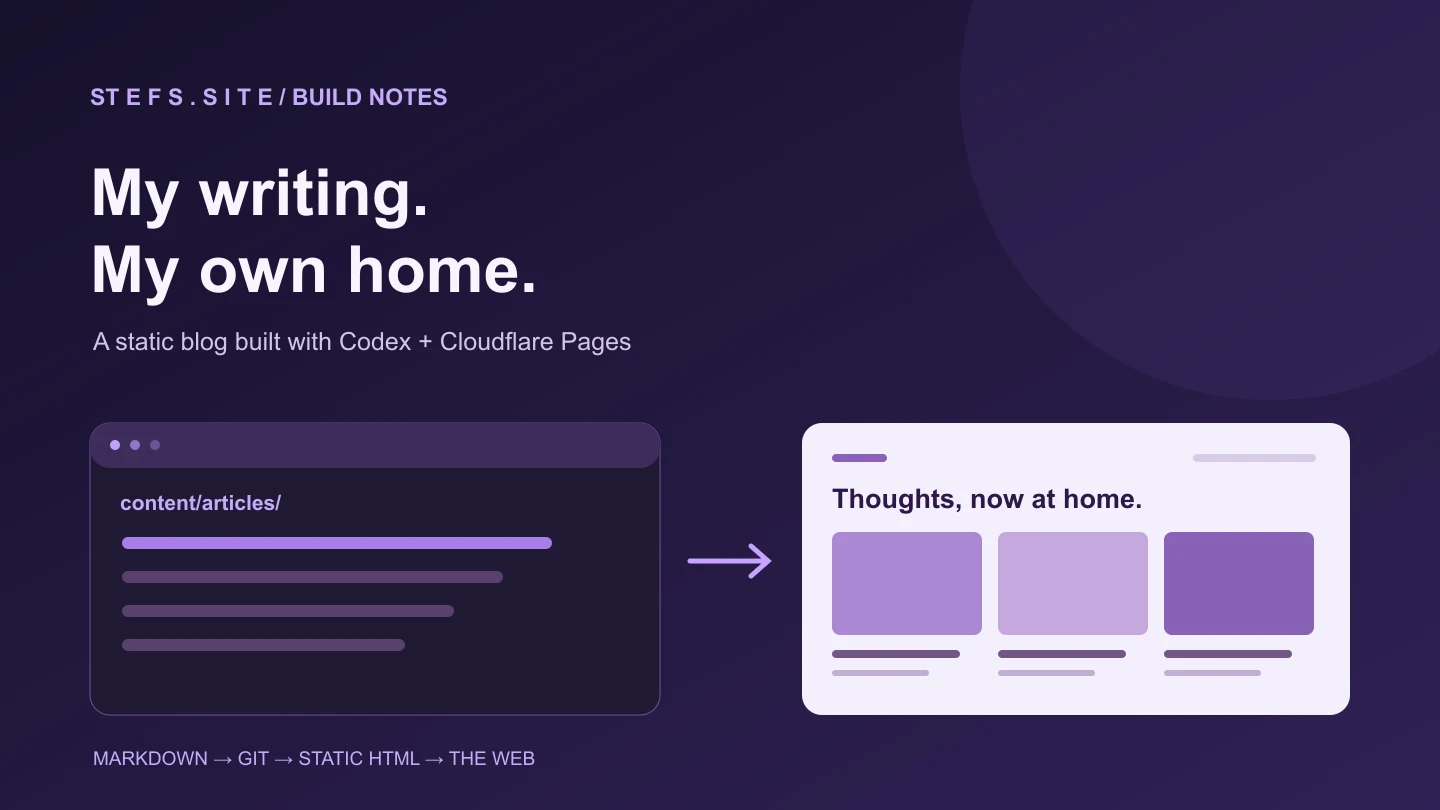
Static content → Git repository → Cloudflare Pages → CDN → browser.
That is about it.
There are fewer things to patch, fewer things to break and fewer services that need to remain alive for someone to read an article.
The attack surface is smaller.
The hosting requirement is tiny.
Performance is naturally good because most requests ultimately come down to delivering static assets.
And moving the whole thing somewhere else is entirely realistic.
Sometimes the best infrastructure is the infrastructure you managed to remove.
The unexpected lesson from using Codex
The most interesting part of this project was not that an AI generated a website.
It was seeing where coding agents are becoming particularly effective.
A migration like this contains lots of work that is individually simple but collectively annoying:
- create files;
- transform content;
- update metadata;
- fix paths;
- inspect project structure;
- repeat the same pattern seventeen times;
- test the result and correct inconsistencies.
That is exactly the sort of work I would normally procrastinate on.
It is also exactly the sort of work a repository-aware coding agent can absorb.
I still needed to decide what I wanted.
I still needed to choose the architecture.
And I still needed to recognise when things were broken, as the earlier Netlify JavaScript adventure demonstrated.
But once the direction was clear, Codex could do a surprising amount of the implementation and migration work.
That feels more consequential to me than simply generating code from a prompt.
What's next: making a static blog easier to actually use
Getting the blog online was the first milestone.
The next one is removing some of the friction that inevitably comes with managing a site primarily through Git and source files.
I deliberately moved away from a traditional CMS, but there are a few things traditional CMS platforms get very right, particularly the ability to open a browser, write something and hit publish.
So the next phase is about adding some of that convenience back without giving up the static architecture.
A GUI editor and Pages CMS
One tool that kept coming up while I was researching the project was Pages CMS.
The idea is appealing: keep the content in Git, keep the static build and deployment workflow, but put a graphical editing interface over the top of it.
Instead of opening an IDE whenever I want to correct a typo or publish a short post, I want the option of opening a web interface, editing the article and committing the change through the CMS.
In other words:
Git remains the database, but I don't always need to interact with Git directly.
That could give me something approaching the convenience of WordPress without rebuilding the architecture around a conventional CMS.
The interactive Pages CMS demo and quick-start guide are useful places to explore it. Autosave and recovery are still requirements I want to verify before relying on it for longer drafts.
Privacy-friendly analytics with Umami
Analytics were another obvious next step, and Umami is now deployed across the homepage and blog.
I want to know whether people actually read these posts, where traffic is coming from and which articles continue attracting visitors over time.
But I do not need an enormous advertising analytics stack attached to a personal blog.
I chose Umami for exactly this reason. The tracker runs on the production domain, excludes local and preview deployments, and respects Do Not Track.
The goal is relatively simple analytics: page views, referrers, popular content and basic visitor trends, without turning the site into a collection of tracking scripts.
There is also something quite fitting about pairing a lightweight static blog with lightweight analytics.
Comments without requiring everyone to be a developer
Comments are a more difficult problem.
A lot of Jamstack blogs use systems that store comments in GitHub Issues or GitHub Discussions.
Technically, that is elegant.
Socially, I am less convinced.
Requiring somebody to have a GitHub account before they can comment makes perfect sense for a developer documentation site. It makes much less sense for a general personal blog where readers could come from LinkedIn, search engines, friends, previous colleagues or completely non-technical backgrounds.
I would rather build something more inclusive than "Sign in with GitHub to comment."
So I am looking at Jamstack-compatible commenting systems where the frontend can remain static while comments are handled separately.
The current site uses Giscus, which stores discussions on GitHub. GraphComment is one of the alternatives I am exploring; it has not replaced Giscus yet.
The ideal system would offer low-friction participation, sensible spam protection and moderation without requiring the whole blog to become a dynamic application.
I may still support GitHub authentication as one option, but I do not want it to be the price of admission.
Editing from my phone
Another goal is mobile publishing.
At the moment, Git-backed publishing is excellent when I have my laptop open.
It is considerably less elegant when I notice a typo while sitting on a train.
Eventually I want to be able to make basic article changes, and perhaps even broader site edits, from my phone.
That could come through Pages CMS or another Git-aware editing interface.
Ideally I could:
- correct an article;
- create a draft;
- update metadata;
- upload or replace an image;
- preview a change;
- publish it;
without needing a full desktop development environment.
Longer term, having full-site editing from mobile would be interesting too.
The source would still live in Git and deployments would still run through Cloudflare Pages, but the interface used to make the change would no longer matter.
Laptop, browser, tablet or phone: they would all ultimately produce the same version-controlled commit.
That is where I think this setup starts becoming particularly compelling.
I get the portability and simplicity of a static site without accepting that every content update needs to feel like a software deployment.
From GCS to Netlify to Cloudflare
So the journey ended up looking roughly like this:
Google Cloud Storage
My original static-hosting approach. Simple and very cloud-engineer-ish, but increasingly awkward as I wanted a more integrated deployment workflow.
↓
Netlify
A useful intermediate step. It also exposed some old assumptions in the site, including broken JavaScript paths, missing assets and a mobile menu that stopped behaving.
↓
Git + Cloudflare Pages
The setup that finally clicked. Static deployment, Cloudflare integration, no server maintenance and effectively no hosting cost for this workload.
↓
Codex + 17 LinkedIn articles
The step that transformed the site from a portfolio with the idea of a blog into an actual blog containing years of existing content.
↓
Pages CMS + Umami + better comments + mobile editing
The next stage: keeping the static, Git-backed foundation while making the site increasingly convenient to publish, measure and interact with.
Finally, my writing has a home
This project had been sitting in the "I really should do that someday" category for a long time.
The irony is that the final platform is simpler than several of the approaches I experimented with along the way.
There is no complicated CMS.
There is no production server for me to SSH into.
There is no database required to render an article.
There is just my site, my content, Git and a static deployment platform.
And perhaps most importantly, those 17 LinkedIn articles are no longer stranded inside LinkedIn.
They now have a home I control.
There is still plenty I want to add.
- A browser-based editor through Pages CMS or a similar tool.
- More insight from the Umami analytics now installed.
- A commenting system that does not assume every reader has a GitHub account.
- The ability to edit and publish properly from my phone.
But those are now enhancements to a working foundation rather than blockers preventing me from having a blog in the first place.
After Google Cloud buckets, Netlify debugging, broken JavaScript, various static-blog ideas and more experimentation than should probably have been necessary, I finally have the personal publishing setup I wanted.
And perhaps the best part is that the next improvements do not require undoing any of it.
The site can stay static. The content can stay mine. The editing experience can keep getting better.
Resources for building something similar
-
Eleventy documentation: the static site generator used for this blog.
-
OpenAI Codex: the coding agent I used during the build and migration.
-
Cloudflare Pages Git integration: how repository pushes trigger deployments.
-
Cloudflare’s Eleventy deployment guide: the framework-specific setup. This project uses its own
build:pagescommand for the additional checks. -
Cloudflare Pages limits: check the current allowances before choosing a plan. The $0 figure above refers to this blog’s hosting, not domain registration or AI tooling.
-
Google Cloud Storage static website hosting: the bucket-hosting approach I started with.
-
Browse the article archive: the migrated writing, now alongside new articles published here.
-
Pages CMS documentation: configure a Git-backed editor and media fields.
-
Umami documentation: understand pageviews, referrers and custom events.
-
Giscus and GraphComment: the current comment system and an alternative under consideration.
Share this article
Thanks for reading.
Get in touch ↗

Join the conversation
Comments and reactions use GitHub. Sign in to join in, and keep the discussion thoughtful and respectful.
View discussions on GitHub ↗